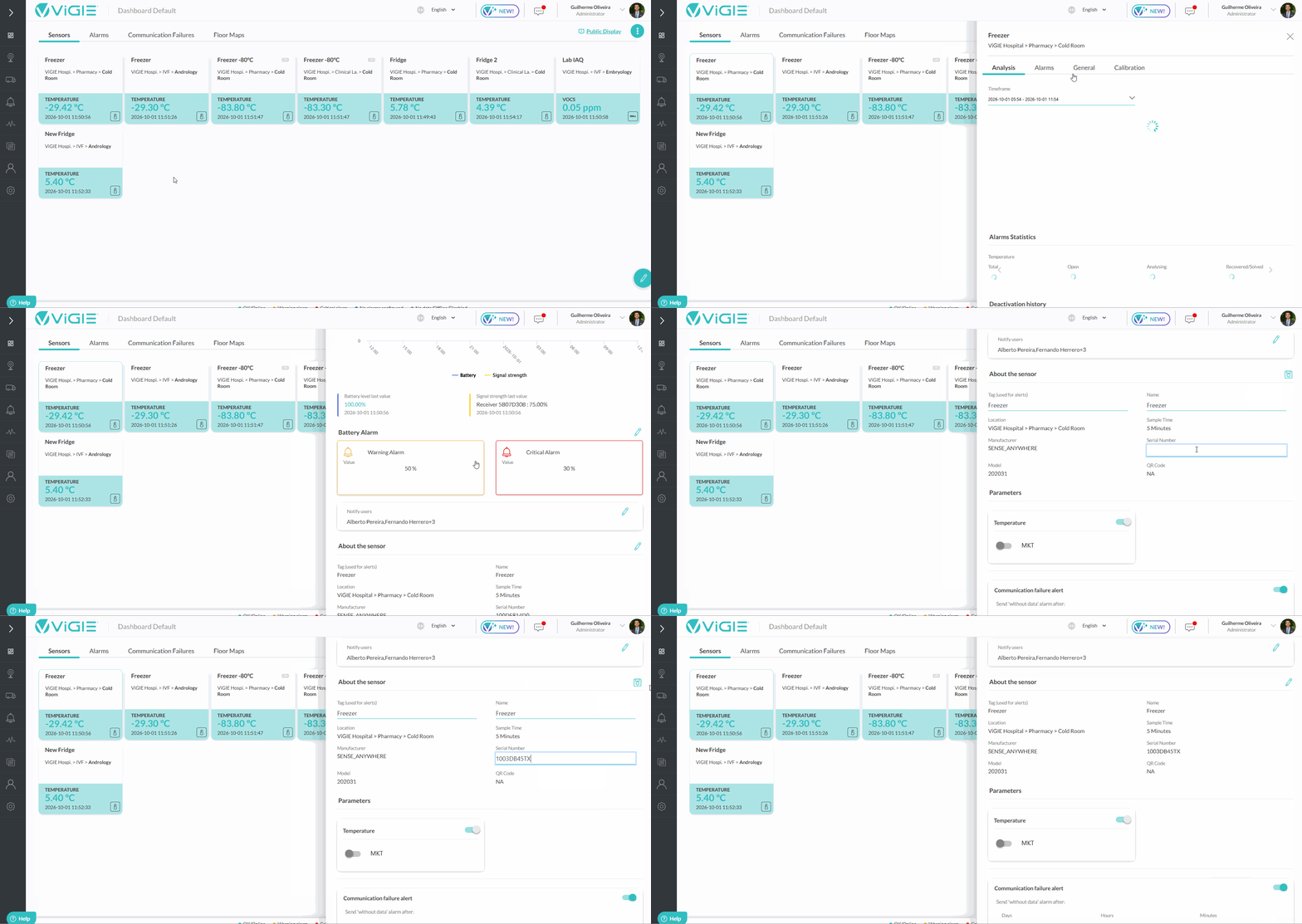
To change the serial number of a sensor, go through the following steps:
Step 1: Select the sensor you wish to change the serial number. There are three ways to select it:
1ª: Select, in the Sensors tab of your Dashboard, the desired sensor widget.
2ª: In the main menu, on the left side, click on Locations and Equipment. Select Locations and then find the desired sensor in your organization's structure.
3ª: In the main menu, on the left side, click Settings. Select Monitoring, then find and click on the desired sensor.
Step 2: A side window will open (Sensor View). Select the General tab.
Step 3: In the About sensor section, click on the edit button.
Step 4: Edit the Serial Number field.
Note: Each sensor can only have one unique serial number. This means that, when changing it, the new number must not already exist on the platform.
Step 5: Click on the save button.
Example of procedure:
Was this article helpful?
That’s Great!
Thank you for your feedback
Sorry! We couldn't be helpful
Thank you for your feedback
Feedback sent
We appreciate your effort and will try to fix the article